How to get your HubSpot developer key and OAuth 2 credentials (Legacy Apps)

Updated:


February 12, 2023

This guide will show you how to retrieve your OAuth 2 credentials and developer API key in HubSpot.

Note: HubSpot allows you to create different types of apps - public and private. This guide is about public apps.

Register a HubSpot Developer Account

First, you'll need to register for a free account on HubSpot if you haven't already.

  1. Navigate to the HubSpot Developers portal.
  2. Click Create App Developer Account.
  3. Follow the onboarding to complete your account setup.

Get your HubSpot Developer API key

Developer account API keys are separate from standard API keys - they can be used to manage subscriptions for webhooks and other HubSpot features.

  1. Inside the HubSpot developer dashboard, open the sidebar and click Apps.
  2. Click Get HubSpot API key.
  3. Follow the instructions to create a Developer API key.
  4. Click Show key to reveal your key. You will need this for the final step.

Create a HubSpot app

A HubSpot app is a container for your integration settings and is where you'll create and find your OAuth 2 credentials.

  1. On the Development page → Legacy Apps→ click Create Legacy App → Select Public App.
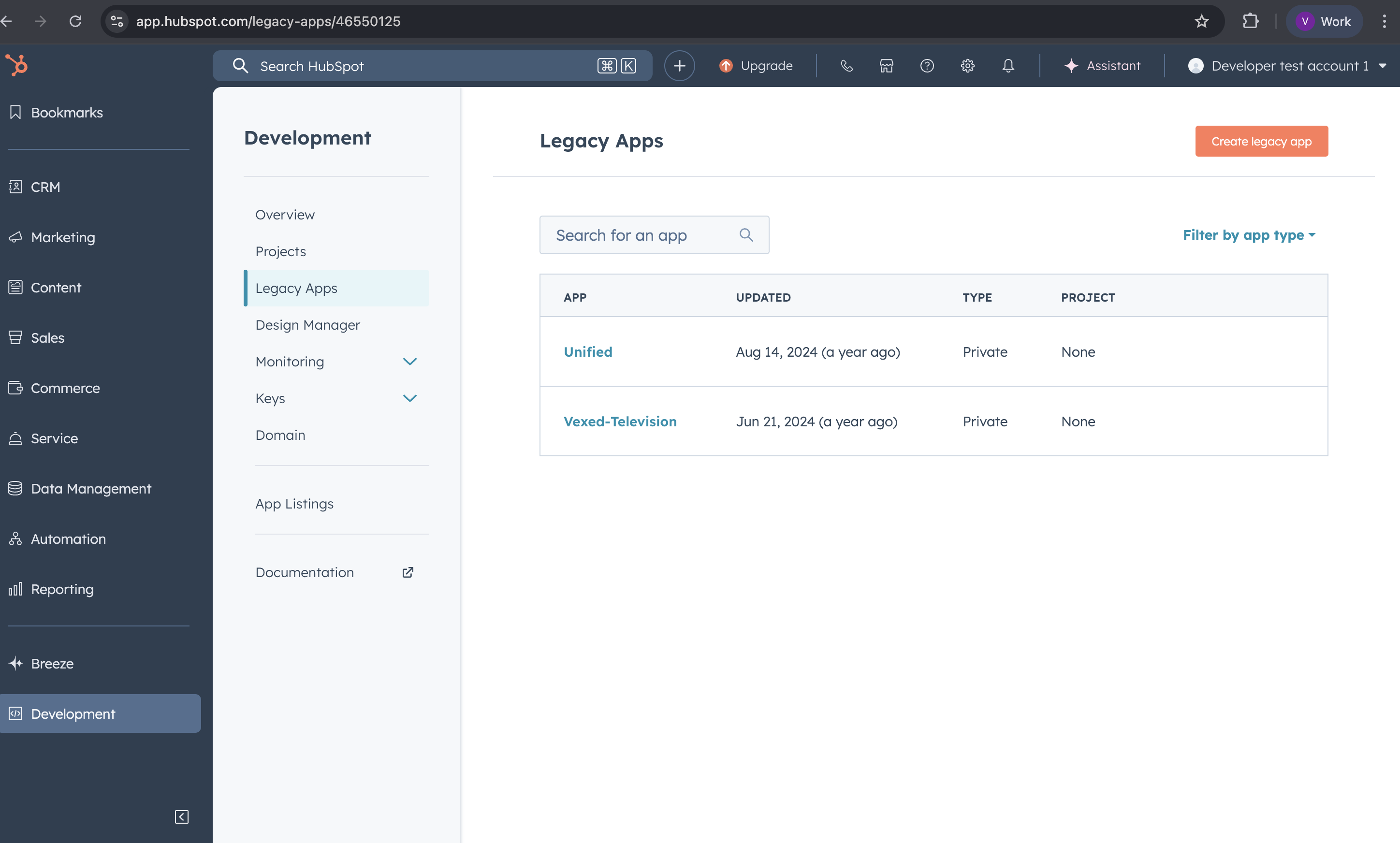
image.png

  1. Give your app a name and description.
  2. Click on the Auth tab.
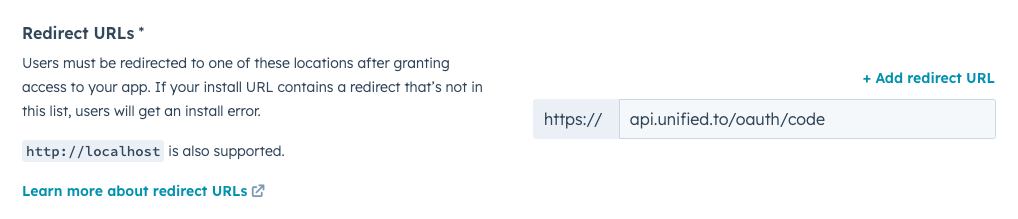
  3. Under Redirect URLs, enter: https://api.unified.to/oauth/code
    Screenshot_2024-08-16_at_3.41.50_PM.png
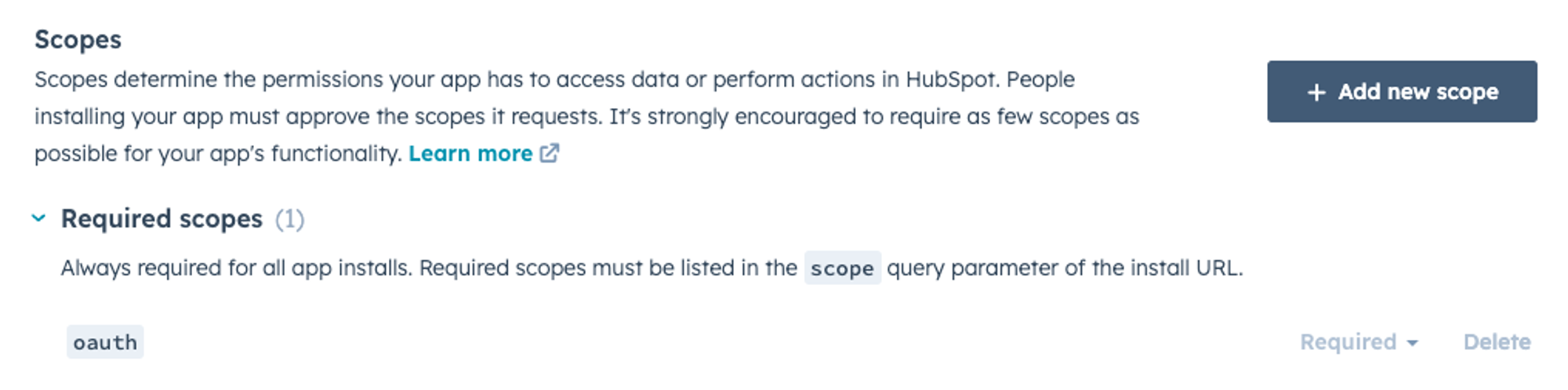
  4. Under Scopes, click Add new scopes and select the permissions that your application will require. For example, if your application reads Deals, then select crm.deal.read
    ba5f5e7e-5c03-49b4-8662-75d3a50f4f01.png
  5. Click Create app to finish setting up your app.

(optional) Add the oauth scope to your app

For apps created before April 2024, the oauth scope may be missing from your app's auth settings. Apps created after this date have it on by default. This scope is required for the HubSpot integration to work.

  1. Under Scopes, click Add new scope.
  2. Search for oauth and select it.
  3. Click Update.

Get your OAuth 2 credentials

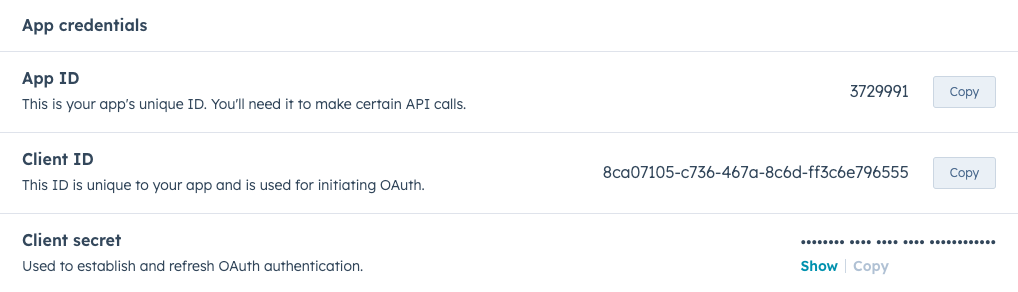
  1. After creating your app, you will be redirected to the App Info tab. Click again on the Auth tab.
  2. Your unique Client ID and Client secret will be displayed. You will need these for the next step.
    Screenshot_2024-08-16_at_3.52.29_PM.png

Activate the HubSpot integration in Unified.to with your client ID and secret

  1. Open a new tab and navigate to the HubSpot integration in Unified.to
  2. You will need the following three pieces of information from the earlier steps:
    1. Client ID
    2. Client secret
    3. Developer API key from the developer dashboard
  3. Copy and paste these values into their respective fields on the page. Make sure that Your OAuth 2 credentials is selected above.
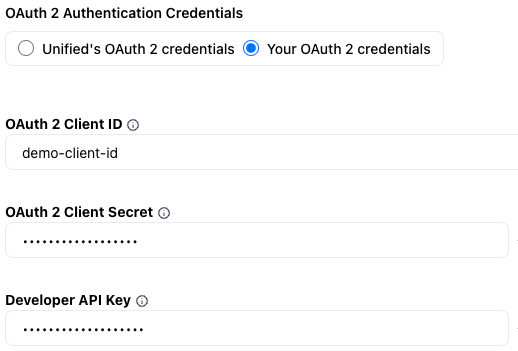
    Screenshot_2024-08-16_at_4.19.04_PM.png

See also

Share
All guidesEmbedded Authorization/Sign-inAuthentication/Sign-in APIsAdvertising Report Metrics by IntegrationAmazon S3: Required IAM PermissionsATS to Vector DB: How to Power Talent Intelligence with Real-Time DataBuilding AI applications with Unified and LangbaseConcur & Concur (Company) — Connection GuideConfigure Greenhouse Native Candidate WebhooksConfigure Salesforce Meetings and Notes for UnifiedConnect Amazon Seller Central to Unified.toConnecting BambooHR via OAuth 2Connecting Google Workspace Integrations with a Service AccountCorrect WelcomeKit Scopes for Jungle IntegrationCreating Ads using the Unified Ads APICreating Walmart Items via UnifiedEnd-Users, Integrations, and ConnectionsEnriching Unified Objects with Custom MetadataEnterprise-managed authorization (EMA) with a static keyEnterprise-managed authorization (EMA) with a workspace secretEnterprise-managed authorization (EMA) with Microsoft Entra IDExtended observability — pushing API logs to ClickHouseExtended observability — pushing API logs to Grafana / LokiExtended Observability - Pushing API Logs to your Datadog InstanceFacebook Messenger Webhook SetupFireflies Integration GuideGetting started with WorkableHandling Delegated vs. Application Scopes in Microsoft IntegrationsHiBob & Unified: connection and time off guideHow long are logs retainedHow to access employees and usersHow to add API support for the Create Activity in CrelateHow to Associate a Connection ID with Your End-UserHow to build a Candidate Assessment product withHow to build a candidate sourcing or job board app with Unified.toHow to build a Discord support bot with Unified.to and LangbaseHow to Build a Fintech Application with Unified's Payments APIHow to Build an E-Commerce Product Integration with UnifiedHow to build an invoicing system with Unified.toHow to build Enterprise Search using RAGHow to configure Bullhorn Redirect URI for creating a connectionHow to configure webhooks in HubSpotHow to configure webhooks in Thrive LearningHow to configure webhooks in Toast for UnifiedHow to Connect Anthropic to Real-Time SaaS Data with Unified.to MCP ServerHow to Connect Cohere to Real-Time SaaS Data with Unified.to MCP ServerHow to Connect Google Gemini to Real-Time SaaS Data with Unified.to MCP ServerHow to connect HiBob (Bob) to Unified with OAuth 2.0How to Connect LLMs to Real-Time SaaS Data with Unified.to MCP ServerHow to Connect OpenAI to Real-Time SaaS Data with Unified.to MCP ServerHow to Connect Zoom and Zoom PhoneHow to create a Connection In Microsoft TeamsHow to create a token-based connection in HighlevelHow to Create a Unified.to Connection to HighLevelHow to Create a Xero Connection in Unified.toHow to create and configure webhooksHow to create Connection with HubspotHow to customize portal URLs for Stripe and GoCardlessHow to filter webhook eventsHow-to Get a Private Support Channel for Your Unified IntegrationHow to get help fromHow to get your 8x8 Connect API Key and Account ID: Step-by-step guideHow to get your ADP Workforce Now Oauth2 client ID, Oauth2 client secret, Oauth2 PEM certificate and Oauth2 private key: Step-by-step guideHow to get your Amazon S3 AWS Region, AWS S3 Key and AWS S3 Secret: Step-by-step guideHow to get your Ashby API Key: Step-by-step guideHow to get your Brex API token: Step-by-step guideHow to get your Bullhorn OAuth2 Client ID, OAuth2 Client Secret, API Username and API Password: Step-by-step guideHow to get your Ceridian Dayforce Username, Password and Client Namespace: Step-by-step guideHow to get your Crelate API key: Step-by-step guideHow to get your Dashlane API Key: Step-by-step guideHow to get your Deel Access Token: Step-by-step guideHow to get your Dialpad API Key: Step-by-step guideHow to get your Discord OAuth 2 credentials and bot tokenHow to get your ELMO client ID and client secret: Step-by-step guideHow to get your Gainsight Client ID, Client Secret and Gainsight API Domain: Step-by-step guideHow to get your Greenhouse API Key and Job board token: Step-by-step guideHow to get your Helpscout API Key: Step-by-step guideHow to get your HiBob Service User ID and Service User Token: Step-by-step guideHow to get your HighLevel API Key and Location ID: Step-by-step guideHow to get your Humaans API Key: Step-by-step guideHow to get your iCIMS API Username, API Password and Customer ID: Step-by-step guideHow to get your JobDiva Client ID, Username/email and Password: Step-by-step guideHow to get your Jobvite API Key, API Key Secret and Email: Step-by-step guideHow to get your Lever API Key: Step-by-step guideHow to get your Loxo Agency slug, API Key and Agency ID: Step-by-step guideHow to get your Microsoft Active Directory / Entra ID Client ID, Client Secret and Tenant ID: Step-by-step guideHow to get your Microsoft Azure AD OAuth 2 credentialsHow to get your OAuth 2 credentials for GmailHow to get your OAuth 2 credentials for Microsoft Dynamics 365How to get your OAuth 2 credentials in PipeDriveHow to get your OpenAI API Key: Step-by-step guideHow to get your Paycom SID/Username and Token/Password: Step-by-step guideHow to get your PCRecruiter Username, Password, Database ID, App Key and App ID: Step-by-step guideHow to get your SAP SuccessFactors (OpenID Connect) Username, Password, Client ID, Client Secret, Dependency Name, IAS Host and API URL: Step-by-step guideHow to get your SAP SuccessFactors Username, Company ID, Password and API URL: Step-by-step guideHow to get your Shopify Admin API access token and Store ID: Step-by-step guideHow to get your Wayfair Client ID, Client Secret and Vendor Encrypted Key: Step-by-step guideHow to get your Workable API Token and Subdomain: Step-by-step guideHow to get your yotpo APP Key / Store ID and Secret Key: Step-by-step guideHow to Handle Attachments in Invoice, Bill and Credit MemoHow to migrate or import your integrations into Unified.toHow to obtain your GitHub OAuth2 credentialsHow to Power Claude with Live Customer Data Using Unified MCPHow to receive assessment orders from an ATS with Unified.toHow to register a Google developer app and get OAuth 2 credentialsHow to register a Salesforce developer app and get OAuth 2 credentialsHow to register a Slack developer account and get OAuth 2 credentialsHow to Register a Workday Developer App and Get OAUTH2 CredentialsHow to Register a Workday Developer App and Get OAUTH2/ SOAP CredentialsHow to Register a ZendeskSell Developer App and Get OAUTH2 CredentialsHow to Register a Zoho Developer App and Get OAUTH2 CredentialsHow to Register an ADP Developer App and Get OAUTH2 CredentialsHow to Register an Atlassian Developer App and Get OAUTH2 CredentialsHow to Register your Facebook OAuth2 ApplicationHow to Register your Google Ads OAuth2 ApplicationHow to Register your MetaAds OAuth2 applicationHow To Request & Write Raw Integration DataHow to Retrieve Microsoft Dynamics 365 Business Central CredentialsHow to set up a custom API URL with a CNAMEHow to set up a HiBob marketplace installHow to Set Up a Microsoft Teams Bot with UnifiedHow to set up and configure NotionHow to set up Google Business Profile API access and get OAuth 2 credentialsHow to Set Up LinkedIn Webhooks with UnifiedHow to set up native webhooks for QuickBooks Online with UnifiedHow to set up Slack webhooks using event subscriptionsHow to set up Telegram (bot) with Unified.toHow to set up your scopes in HubSpotHow to setup a Freshbooks developer appHow to setup a TikTok Shop applicationHow to Setup AWS Assume Role for AWS Secret ManagerHow to setup Oracle JD EdwardsHow to Setup Quickbooks DesktopHow to setup Sage 100 with Unified.toHow to test webhooks in the Synthetic Data (Sandbox) environmentHow to troubleshoot unhealthy connectionsHow to troubleshoot unhealthy webhooksHow to use SCIM with the Unified APIHow to use the Passthrough APIHow to Use Unified.to's Generative AI API with OpenAI and ClaudeHow to use User Provisioning and Verification with UnifiedHow virtual webhook retry and recovery worksIntegration set-up guide for LeverManaging custom validation rules in SalesforceNetSuite Authentication Setup for UnifiedNotice of Deprecation of Fields and Objects (Nov 2025)Oracle HCM / Taleo OAuth Credentials GuideRetrieval-Augmented Generation (RAG)SalesForce (External Client Apps) on Multiple OrganizationsSAML Single-Sign-OnScaling MCP Tools with Anthropic's (& OpenAI's) Defer LoadingSet Environments for your Unified.to WorkspaceSetting up a Slack Bot Connection with Unified.toSetting up OAuth 2 Credentials for Greenhouse's APIsTrello Connection Guide in UnifiedUnderstanding OAuth2 Authorization flowsUnderstanding Response Time Headers in the Unified APIUnified Assessment API: Embed Assessments Inside ATS PlatformsUnified's MCP ServerUnified MCP Server with LangChain and LangGraphUnlock real-time data with virtual webhooksUse Unified to sign in your users into your applicationVincere OAuth Setup Guide for UnifiedWorkable: Creating candidates and attaching them to jobsWorkday vs Workday Legacy — Why Unified.to Supports BothWorking with hierarchical tree data in Storage, Messaging, and KMS APIs
Are we missing anything? Let us know
Was this page helpful?