

How to Register a Workday Developer App and Get OAUTH2 Credentials
March 13, 2023
As a developer of an application in the HR space, you absolutely need to have a Workday integration so that you can access your customers' data in the most popular HRIS vendor, Workday.
Before you can use Unified.to's HRIS and ATS unified APIs with Workday, you must get your customer to generate Workday API credentials for your application.
Register a new API Client in Workday
- Sign-in to the Workday tenant
- Search for 'Register API Client for Integration' using the search bar
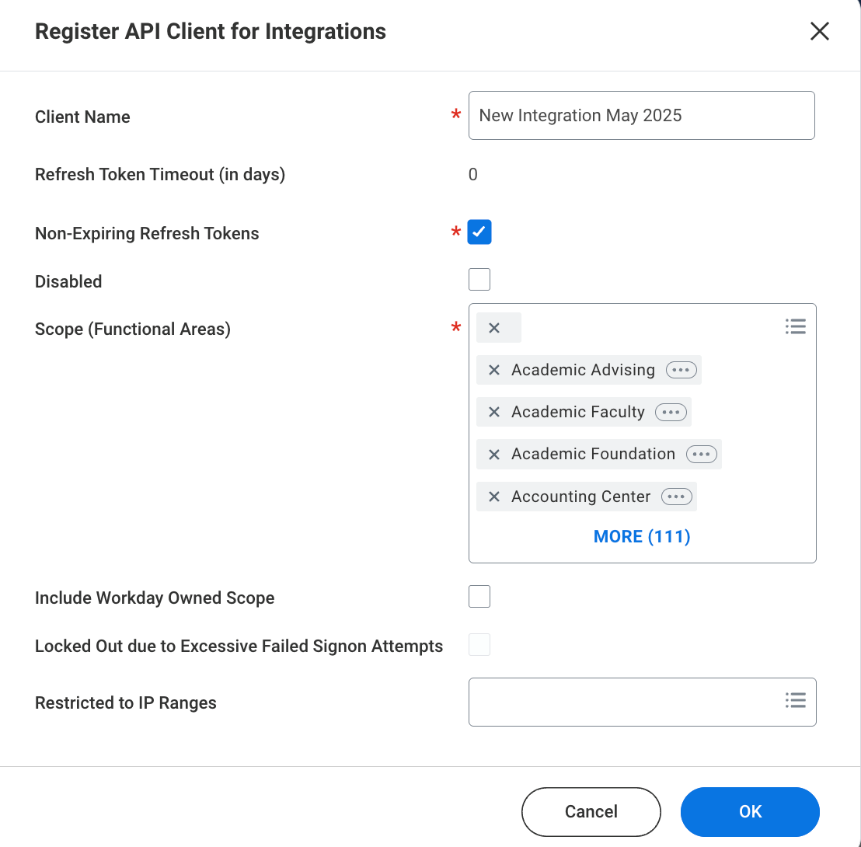
- Fill out the requested inputs with the following example details:
- Client Name;
- Refresh Token Timeout; 0 days (ie. never)
- Non-Expiring Refresh Token: Checked
- Scope: Choose all of the permission scopes for the use-case. Minimum should be 'Staffing' (for employee/worker access), 'Leave of Absence' (for timeoff). Always include 'Tenant Non-Configurable' and 'Integration' as well.
- Client Name;
- Once the API client has been registered, go to 'Related Actions' icon ⇒ 'API Client' ⇒ 'Manage Refresh Tokens for Integrations'
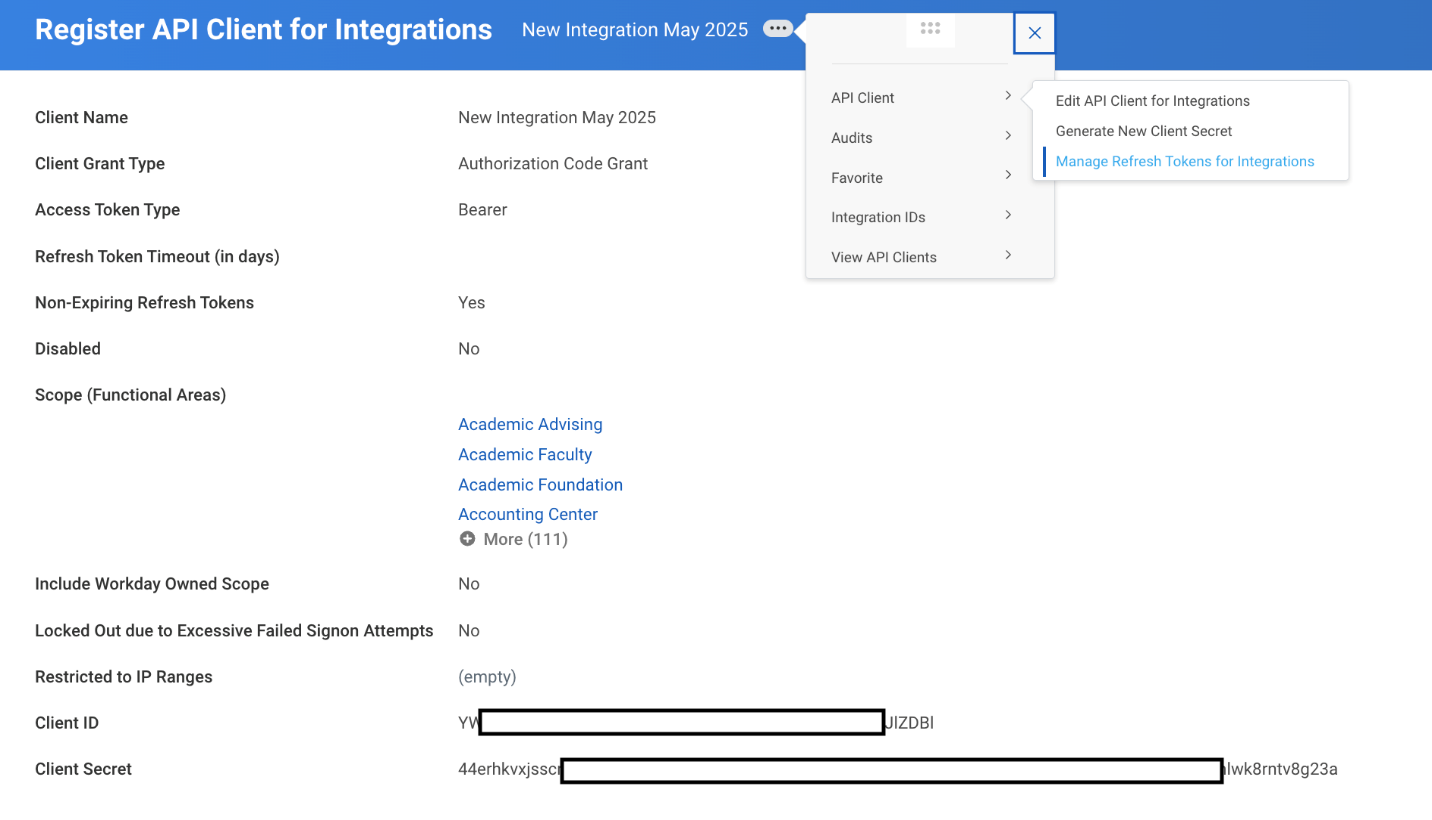
- Remember the Client ID and Client Secret
- Enter the 'Integration System User (ISU)' in the Workday Account field. This ISU needs to have access to all of the resources that you need for the API.
- Check the "Regenerate New Refresh Token" box and click OK.
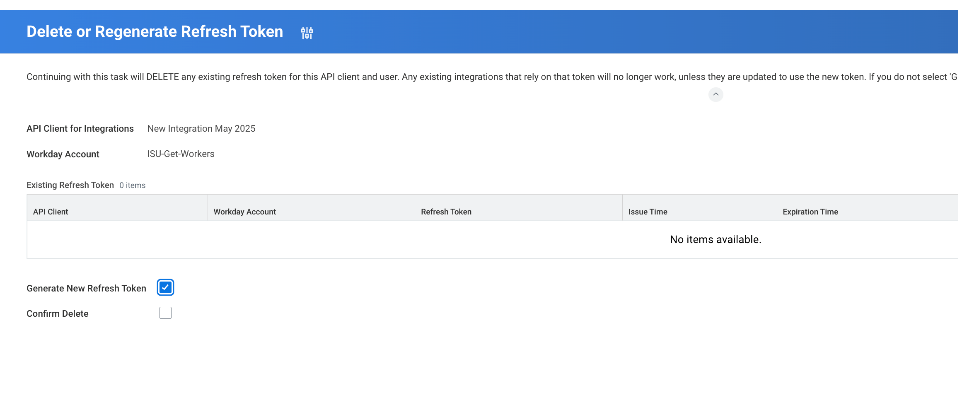
- A new refresh token will be generated. Remember that Refresh Token.
Use Unified.to to Simplify your Integrations Development
Using Workday APIs directly can be complex and time-consuming, especially if you want to integrate with multiple services or platforms. You will need to handle the authentication, the error handling, the rate limiting, the data mapping, and the synchronization logic for each integration.
A simpler and faster alternative is to use Unified.to APIs for HRIS and ATS integrations. It provides a unified set of APIs, data-models, and webhooks for most of the HRIS and ATS integrations.
Activate Workday in Unified.to
- Navigate to Active Integrations
- Search for Workday
- Click on Activate on Workday
- Choose how your customers will connect, and enter the details from the previous step.
Unified supports two ways to connect Workday:
Option A: API token (refresh token)
Your customer enters the following when they connect. All values are found in Workday under View API Clients → API Client for Integration:
- Client ID
- Client Secret (use Generate New Client Secret if you don't have it)
- Refresh Token (from step 8 above)
- Token URL — the Token Endpoint, for example
https://your_workday_domain/ccx/oauth2/tenant_id/token - API URL — the REST API URL, for example
https://your_workday_domain/ccx/api/v1/tenant_id - Tenant ID
Option B: OAuth 2
With OAuth 2, a Workday user signs in and approves access instead of sharing a refresh token. Register an API Client in Workday (Register API Client, rather than Register API Client for Integration) with the Unified redirect URI for your region (for example https://api.unified.to/oauth/code), then enter the following, found under View API Clients → API Client:
- OAuth2 Client ID
- OAuth2 Client Secret (shown only once, when you register the API Client)
- Authorize Endpoint, for example
https://your_workday_domain/tenant_id/authorize - Token Endpoint, for example
https://your_workday_domain/ccx/oauth2/tenant_id/token - REST API URL, for example
https://your_workday_domain/ccx/api/v1/tenant_id