

Unified Assessment API: Embed Assessments Inside ATS Platforms
February 9, 2026
Most assessment integrations rely on application status changes or external tools. Recruiters switch systems, and providers handle fragmented integration logic. Some ATS platforms now support embedded assessment listings, where recruiters select and order assessments directly inside the ATS.
With the Assessment API, the recruiter orders your assessment inside the ATS and the order reaches you by webhook; you don't poll or watch status changes.
What is an Assessment API?
An assessment API allows assessment providers to integrate directly into ATS platforms so recruiters can request candidate assessments without leaving the ATS. Instead of triggering assessments based on status changes, recruiters select assessment packages inside the hiring process, and the order is routed to the provider by webhook.
The Assessment API covers package management, order delivery and result submission for ATSes with an embedded assessment module.
Why ATS-native assessment integrations matter
Recruiters order the assessment at the point of decision, without switching tools, and the result is written back to the system where the hiring decision is made.
Three ways to integrate assessments with Unified
1. Embedded (Assessment API)
- Recruiter selects assessment inside ATS
- Best UX, requires ATS support
2. Triggered (ATS API)
- Trigger on status change
- Works on any ATS integration that returns applications
3. Verification-style (Verification API)
- ATS/HRIS calls provider directly
- No marketplace required
Unified Assessment API
The Unified Assessment API allows assessment and background check providers to integrate directly with Applicant Tracking Systems (ATS) platforms that support embedded assessment listings.
This API enables recruiters to request assessments for candidates directly from within their ATS. The recruiter does not need to log into a separate assessment platform or use a separate system.
Instead, the assessment package is selected inside the ATS, and the request is routed to your platform through Unified.
This is different from triggering assessments based on status changes. It is a recruiter-initiated flow inside the ATS itself.
Core objects in the Assessment API
- Packages: define assessment offerings, metadata, scoring, and configuration
- Orders: represent assessment requests, candidate context, and lifecycle state
- Results: fields on the order (
response_score,response_url,response_attributesand others) that you update when the assessment is done
Orders include rich candidate, job, and application context, allowing providers to tailor assessments and return structured results directly into the ATS.
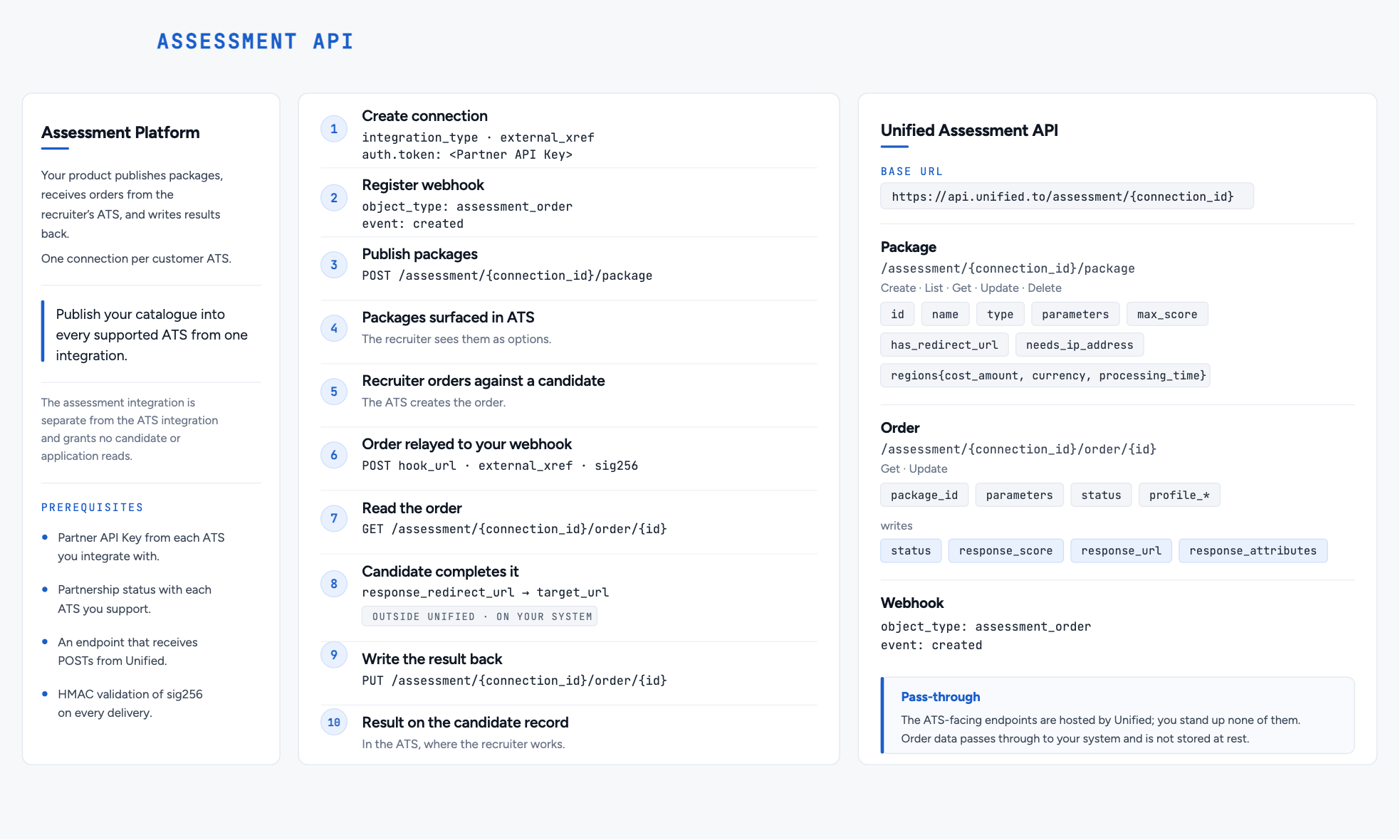
What can you read and write?
The Assessment API supports both:
- Creating and managing assessment packages
- Receiving assessment orders by webhook
- Updating orders with structured results and scores
Calls go to the source ATS at request time, with no customer records at rest; connection credentials and operational metadata are encrypted at rest.
Using assessment data in AI systems
Because your product holds the structured results it writes back, you can also use them to:
- Generate candidate summaries and scoring insights
- Feed structured evaluation data into copilots or hiring assistants
- Trigger automated follow-ups or recommendations
What you can build with the Assessment API
- Embedded assessment marketplaces inside ATS platforms
- Partner integrations with ATS vendors (such as Greenhouse, Ashby, Workable)
- Candidate evaluation started by the recruiter inside the ATS
- AI scoring and feedback returned to the ATS
Embedded assessment marketplaces inside ATS
Some ATS platforms support native assessment marketplaces, where providers can list assessment packages directly inside the product.
The Assessment API enables this model by:
- Listing your packages inside the ATS
- Allowing recruiters to select assessments directly
- Sending you each order by webhook
- Returning results back into the same flow
How the Assessment API differs from other Unified APIs
The Unified Verification API is used by ATS or HRIS platforms to call verification or assessment providers in a unified way.
In that flow:
- The ATS or HRIS platform initiates the request.
- They do not need a direct partnership with the assessment provider.
- The call is routed through Unified using the unified verification data models.
The Assessment API is different.
It is designed for assessment providers who want their assessment packages listed directly inside an ATS that supports embedded assessment integrations.
The integration is initiated by the recruiter inside the ATS, not by the assessment provider or backend workflow.
How This Differs from the Unified ATS API
The Unified ATS API allows assessment providers to listen for job application changes and trigger an assessment when an application reaches a specific status.
That flow works across most ATS platforms supported by Unified and does not require a special assessment marketplace integration.
It is best suited for ATS platforms that do not support embedded assessment listings.
The new Unified Assessment API works in a different way:
- It connects directly to ATS platforms that have a dedicated 'assessment API.'
- Your assessment packages are listed inside the ATS.
- A recruiter manually selects a package for a candidate.
- The ATS sends an assessment order through Unified.
- You process the assessment.
- You update the order.
- The results are written back into the ATS.
The key difference:
The recruiter stays inside the ATS the entire time.
There is no external trigger based on status change. The recruiter explicitly orders the assessment.
When Should You Use Each?
For assessment providers:
- Use the Assessment API when the ATS supports embedded assessment listings and you have a partnership with that ATS.
- Use the ATS API for all other ATS platforms.
Most providers will use both:
- Assessment API for supported ATS platforms.
- ATS API as the broad coverage fallback.
The Assessment API reduces recruiter friction but is limited to ATS platforms that expose this functionality.
Who this is for
- Assessment providers (coding tests, behavioral, psychometric, etc.)
- Background check and verification providers
- AI-based candidate evaluation platforms
- Hiring infrastructure tools integrating into ATS ecosystems
Supported ATS Integrations
As of 19 October 2026, the Assessment API connects to the assessment modules of Ashby, ATS Anywhere, Cornerstone, Greenhouse, JobAdder, PageUp, Paylocity, Recruitee, SmartRecruiters, TalentLyft, Teamtailor and Workable. It also orders assessments from assessment companies such as Berke, The Predictive Index and Wonderlic. See the Assessments integration list.
Each of these has a dedicated assessment integration that is separate from the standard ATS integration.
Only ATS platforms that support embedded assessment listings can be supported through this API.
How do you set up the Assessment API?
Step 1: Create a Connection
First, you need to manually create a connection for your assessment integration. This connection will be used to authenticate requests from the ATS.
When creating the connection, you must supply a Partner API Key in the connection.auth.token field that you generate yourself. You will then share this API key with your end-customer to configure the integration in their ATS.
Always check the authentication requirements for each assessment integration as some will require additional authentication information. For example, Ashby also requires a Customer API Key and a Partner ID.
Example Connection Creation:
{
  "integration_type": "greenhouseassessment",
  "auth": {
    "token": "YOUR_PARTNER_API_KEY"
  },
}
Step 2: Configure Webhooks
You also need to set up webhooks to receive assessment orders from the ATS systems.
Required Webhook
Create a webhook with the following configuration:
- object_type:
assessment_order - event:
created
This webhook will be triggered whenever a recruiter requests an assessment for a candidate in the ATS.
Optional Webhook
Some ATS vendors (like Ashby) also send order cancellation events. You can optionally create an additional webhook:
- object_type:
assessment_order - event:
deleted
This webhook will notify you when an assessment order is cancelled.
Step 3: Provide Configuration to Your End-Customer
Once you've created the connection and webhook, provide the following information to your end-customer:
- Base URL:
https://api.unified.to/assessments/{connection_id}- Replace
{connection_id}with the actual connection ID from Step 1
- Replace
- Partner API Key: The token value you set in
connection.auth.token
Your end-customer will then input these credentials into their ATS software to enable the integration.
The Base URL uses /assessments/ (plural). It's the endpoint the customer's ATS calls, using the Partner API Key. It is a different endpoint from the /assessment/{connection_id}/... paths (singular) under API Endpoints below, which your platform calls with your Unified.to API key.
How the assessment flow works
Here's how the assessment flow works:
- Package Configuration: You create assessment packages via the Unified API (w/ assessment packages API endpoints)
- ATS Lists Packages: The ATS queries your available packages
- Recruiter Orders Assessment: A recruiter selects a package and orders an assessment for a candidate
- Webhook Notification: Unified.to sends you a webhook with the order details
- Process Assessment: You send the assessment to the candidate and process their response
- Submit Results: You submit the assessment results back to Unified.to (w/ assessment order update API endpoint)
- Results in ATS: The results appear in the ATS for the recruiter to review
API Endpoints
Assessment Packages
Manage your available assessment packages:
POST /assessment/{connection_id}/package- Create a new packageGET /assessment/{connection_id}/package- List all packagesGET /assessment/{connection_id}/package/{id}- Get a specific packagePUT /assessment/{connection_id}/package/{id}- Update a packageDELETE /assessment/{connection_id}/package/{id}- Delete a package
Assessment Orders
Update assessment order results:
PUT /assessment/{connection_id}/order/{id}- Update an order with results
Webhook Payload
When an assessment order is created, you'll receive a webhook with an AssessmentOrder payload:
{
  "id": "123",
  "package_id": "your_package_id",
  "candidate_id": "candidate_456",
  "application_id": "application_789",
  "job_id": "job_012",
  "profile_first_name": "John",
  "profile_last_name": "Doe",
  "profile_emails": ["candidate@example.com"],
  "status": "OPEN"
}
Submitting Results
Once a candidate completes an assessment, submit the results using the update order endpoint:
PUT /assessment/{connection_id}/order/{order_id}
Example Request:
{
  "status": "COMPLETED",
  "response_score": 85,
  "response_max_score": 100,
  "response_url": "<https://your-platform.com/results/order_123>",
  "response_completed_at": "2024-01-15T10:30:00Z",
  "response_attributes": [
    {
      "type": "TEXT",
      "label": "Overall Assessment",
      "value": "Strong candidate"
    }
  ]
}
status, response_score and response_url are writable on every ATS assessment module; other fields vary, so check the integration page.
The results will then be written back to the ATS system, where recruiters can view them directly.
What should your webhook handler do?
- Secure Your API Key: Treat your Partner API Key as sensitive information. Only share it with trusted end-customers.
- Handle Webhooks Reliably: Implement retry logic and idempotency checks in your webhook handler to ensure you don't miss or duplicate orders.
- Validate Webhook Data: Check the
sig256signature (HMAC-SHA256) and validate the webhook payload to ensure it contains the expected candidate and job information before processing. - Monitor Order Status: Track the status of assessment orders and handle cancellations appropriately when the
deletedevent webhook is received.
What is an assessment API for recruiting platforms?
An assessment API allows providers to integrate directly with ATS platforms so recruiters can request, manage, and review candidate assessments without leaving the ATS. It delivers orders by webhook and writes structured results back to the same system.
How do assessment providers integrate with ATS platforms?
Assessment providers integrate with ATS platforms either through embedded assessment APIs or through status-based triggers. Embedded integrations allow recruiters to select and order assessments directly inside the ATS, while triggered integrations operate based on application state changes.