

How to troubleshoot unhealthy webhooks
September 4, 2024
Webhooks deliver events about changes to the data you care about. When something goes wrong, however, we will mark those webhooks as unhealthy. This guide explains how to diagnose and troubleshoot unhealthy webhooks at Unified.to.
Before you begin
This guide assumes you have a basic understanding of:
Diagnose the webhook
The first place to look for debugging information is in the API call logs.
1. Check the webhook status
- Log in to your Unified.to account.
- Navigate to Webhooks.
- Make note of the unhealthy webhook and its connection ID.
2. Review API call logs
- Go to API Call Logs.
- Filter by the connection ID of the webhook in question. You should see a list of API calls attempted by the webhook (retention depends on your plan; see How long are logs retained).
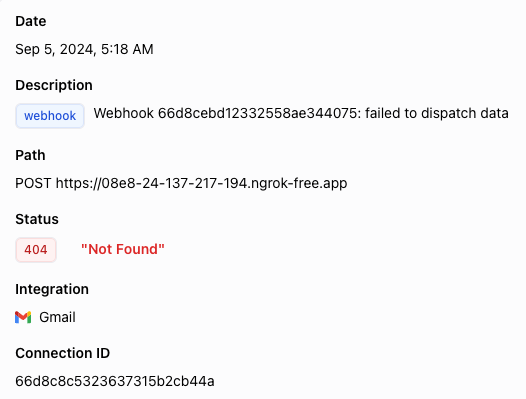
- Click on the latest log entry that threw an error - the status column will display an error code.
- Details about the API call will be shown. The Description field will detail the reason the webhook failed and the Status field will show the specific error code itself. For example:
You can also use the Unified API to retrieve a list of your webhooks and API call logs.
API reference: List all webhooks, List all API calls
Troubleshooting webhook error codes
Bad request (400) errors
These errors indicate that something is wrong with the request - in this case, it is likely not a scope or authentication issue but a problem with the integration itself. Please reach out to us or let us know in our Discord server. Thank you!
Authentication (401) and permission (403) errors
A 401 error may indicate that the connection's auth credentials were entered incorrectly, whether it be the API token, a secret, or another value depending on the integration.
A 403 error is often indicative of scope mismatches with the API provider, with Unified.to, or both.
Both of these errors are indicative of an issue with the connection itself, rather than the webhook. Please see: How to troubleshoot unhealthy connections
Subscribe to the notifications webhook to be alerted when your webhooks fail
To learn about any webhook errors as soon as they occur, we recommend that you subscribe to our Notifications webhook to be notified as soon as a webhook's status changes.
- Navigate to Settings > Workspace.
- Under Notifications webhook URL, enter the URL of the endpoint where you would like to receive notifications.
- The payload that will be sent to this endpoint contains:
id: string // the id of the object or the integration's type
nonce: number // random number
sig: string // @deprecated; use sig256. base64(hmac-sha1(id + nonce + event, workspace.secret))
sig256: string // v1 (existing validators): base64(hmac-sha256(id + nonce + event, workspace.secret))
data: object // { id, event, description?, environment? }
sig256v2: string // v2: HMAC-SHA256(workspace.secret, JSON.stringify(data) + String(nonce)) — same formula as object / data webhooks
event: enum // the event that was triggered
description?: string // optional longer description
environment?: string // included for connection, webhook, or integration notifications
Signature validation: Existing integrations can keep verifyingsig256withid + nonce + event; that formula is unchanged. To use the same check as object / data webhooks, verifysig256v2as HMAC-SHA256(workspace.secret, JSON.stringify(data) + String(nonce)). See Best practices for signature validation in the Webhooks reference.
- The payload that will be sent to this endpoint contains:
- Under Notifications webhook events, select the events you want to be alerted to e.g.
WEBHOOK_UNHEALTHY - On your server, handle incoming notifications as you see fit e.g. set up logging, send a message to the engineering team, post on Slack or Discord, etc.
Understanding why webhooks fail
This section will go over why webhooks fail to provide a deeper understanding of how our webhooks work.
Failed to subscribe
Failing to subscribe happens during webhook creation and can be due to multiple reasons: the integration isn't available, insufficient permissions (i.e. scopes mismatch), or bugs.
Note: This only applies to native webhooks.
Failed to refresh token
Before checking for changes, subscribing, or processing a native event, Unified.to refreshes the connection's auth token when needed. If the refresh fails after retries, the webhook is marked unhealthy so no calls run against an expired token. This applies to both virtual and native webhooks. In this case, it is likely an error with the connection itself.
Double-check that the auth credentials for the connection are correct, that the scopes are set correctly (i.e. they haven't been revoked), and then recreate both the connection and its associated webhook.
Failed to read
Failing to read happens when we attempt to retrieve new data from the API provider and are prevented from doing so, whether due to configuration errors (i.e. 401 or 403 errors) or problems with the integration itself.
Double-check that the auth credentials for the connection are correct, that the scopes are set correctly (i.e. they haven't been revoked), and then recreate both the connection and its associated webhook.
Failed to dispatch data
Failing to dispatch data happens when we attempt to send webhook data to your server but the server does not respond or responds with an error.
Make sure your webhook URL is configured correctly when creating the webhook. Respond with a 2xx status once your endpoint has accepted the data, and do heavy processing afterwards. Otherwise, retry behaviour depends on the webhook type. For virtual webhooks, we keep trying to POST to your server for up to approximately 2 weeks before marking the webhook as unhealthy. For native webhooks, delivery is attempted 3 times immediately; if those fail, the webhook is marked unhealthy and the event isn't redelivered unless the integration sends it again. Keep your endpoint reachable during deploys, or use a virtual webhook where longer recovery matters.
After checking the above, recreate the webhook and try again.
Monitoring webhook health and recreating unhealthy webhooks is your responsibility. Unified.to does not resume an unhealthy webhook on its own. Subscribe to the notifications webhook (above) for WEBHOOK_UNHEALTHY so you find out when it happens.
Failed to process data
Failing to process data indicates a problem with either the reading or dispatching steps. Refer to the troubleshooting steps above and then recreate the webhook and try again.
A note on our webhook retry mechanism
Unified.to retries failed webhook deliveries automatically. Here's how it works.
When your webhook endpoint is unavailable
- If your endpoint is unavailable or returns an error, we'll retry up to 3 times immediately, with a 1-second delay between attempts.
- If the error persists, we back off progressively for up to about 2 weeks, maximizing the chance of successful delivery.
The backoff schedule applies to virtual webhooks. Each delayed retry re-reads the page from the API provider rather than resending a stored payload, and the read position advances only after a successful delivery. If retries are exhausted, the webhook is marked unhealthy and scheduling stops. Native webhooks stop after the 3 immediate retries and are marked unhealthy.
When the API provider is unavailable
If we can't reach the API provider or have hit their rate limits, we will back off progressively and retry (outlined above). On virtual webhooks, we honour the provider's retry-after hints when it sends them.
Billing for failed and empty runs
You aren't billed for failed reads from the API provider, failed dispatches to your webhook endpoint, or virtual webhook polling runs that find no new data.